Two prerequisites must be met:
1. If you have upgraded your account to one of Wix's Premium Plans, you can connect a domain that you purchased from another registrar to your Wix website.
2. You also have hosting with us.
You can connect your domain to your Wix website as follows:
- Add the domain to your Wix account:
* Log in to your Wix account
* In the dashboard, click Domains
* Click Connect a domain you already own (if you already have a domain in your account, click Add Domain and then Connect a domain you already own)
* Select the website you want to connect to your domain and click Next (you will not see this step if your domain is already connected)
* Enter the domain name
* Click the drop-down menu under Where did you buy your domain?
* Select your domain registrar (Other)
* Select the Connection method: Pointing and click Change method.
* The host records that you need to set up on our hosting will be displayed
- What do I need to do on your hosting?
* Follow the step-by-step instructions for setting up the domain records (you do this in our hosting control panel)
Please allow approximately 30 minutes for the records to refresh.
A). Set up the A record and CNAME in the Direct Admin control panel, under Account Manager - DNS Management
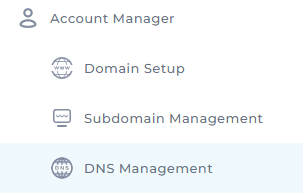
Under Name enter your domain name, and under Value add the A record that you receive from Wix.

B). Setting up the A record and CNAME in the cPanel control panel
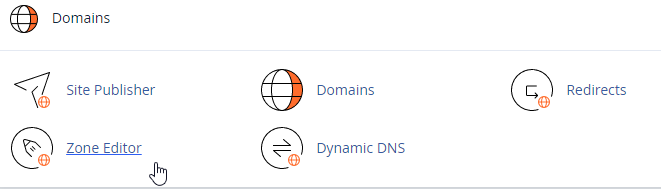
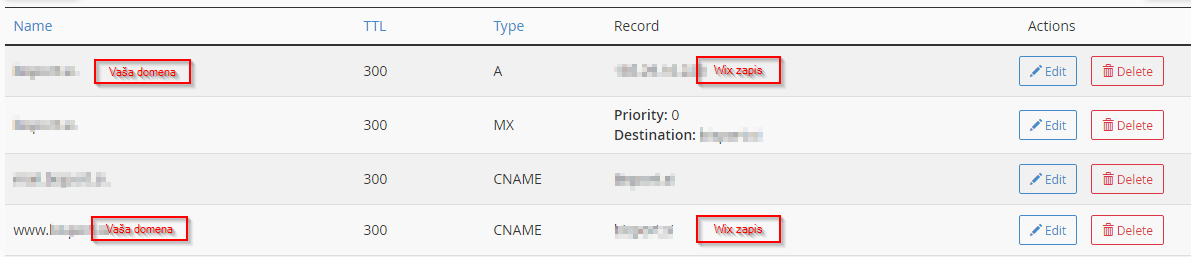
Under A record you will see your domain; in the Record field, enter the A record from Wix. Do the same for the CNAME www.vašdomena.si, and in the Record field enter the CNAME record from Wix.
Go to your Wix account and:
* Click Next on the last step
* Click Close
Please note: It may take up to 48 hours for the changes to become visible.
