Two conditions must be met:
- Your hosting is purchased from zabec.net
- You must upgrade your Weebly account to a paid plan - Starter, Pro or Business
Instructions for connecting your domain to your website:
- You need to create two DNS records that point to one of the Weebly IP addresses.
- Log in to our hosting control panel (you received the login details when you ordered your hosting).
A). Direct Admin control panel
- Log in to the control panel and go to Account Manager > DNS Management
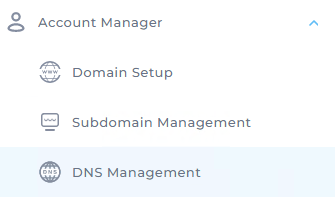
Then click ADD record
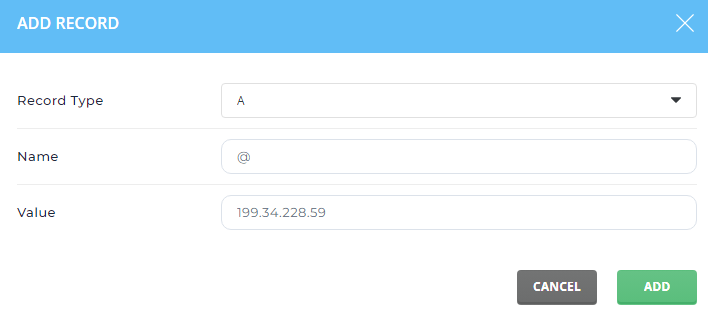
- Create the first A record (Name @ and IP under Value)
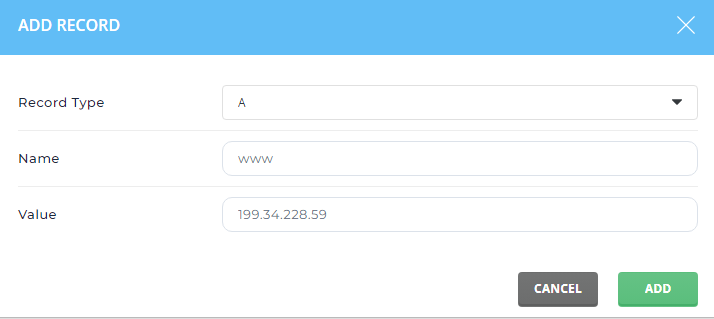
- Create the second A record (Name www and IP under Value)
B). cPanel control panel
- Log in to the control panel and go to Domains > Zone Editor
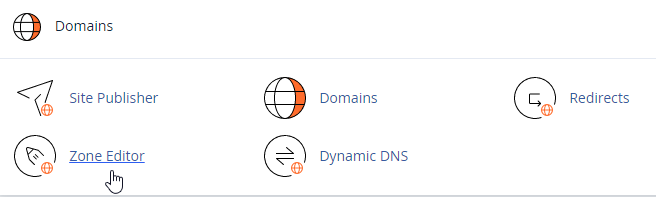
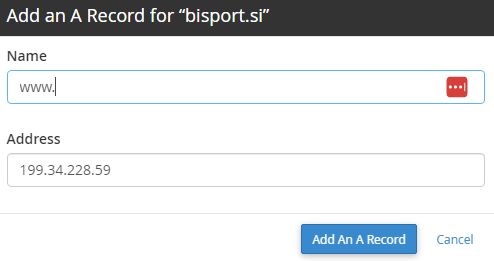
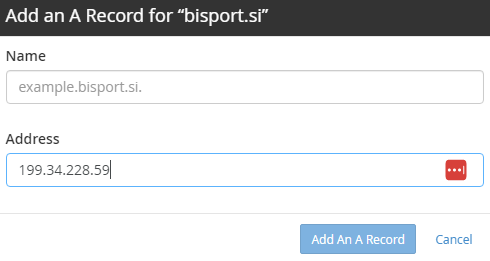
Leave Name empty and enter only the IP in the Address field.
NOTE!
If your domain has a CNAME record or a URL redirect record, delete them.
It may take up to 30 minutes for the changes to take effect.
Once you have made the changes in our control panels, you also need to make changes in Weebly:
- Log in to your Weebly account
- Click Edit
- Select Settings
- Click Change for Site Address
- Select Connect a domain you already own and enter your domain name
- Click Continue
It may take up to 48 hours for the changes to take effect.
