There was a problem loading the comments.

Where do I change the password for RoundCube email in DirectAdmin?

Support Portal  »  Knowledge Base  »  Viewing Article

  Print
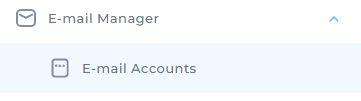
1. Go to E-mail Manager > E-mail Accounts
e4e56279669c60f3d2511cec6cbaebc727c1f0f7d0331b86c43c24c29a7fbd1a058bdad71e1764f8?t=ac73201043587ff5a0dea7a4fe3d8826


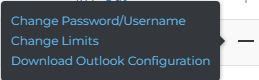
2. Find the email address whose password you want to change and click the + sign on the right-hand side.
4da9a572d50a2a0a32597430a59dbcf397b59caa7ddddb6abf1ba0968cdf68e14a0658b6d2ba1ffd?t=7324b4e47a1064d20aa7660ad46e5bf5


3. Click Change Password/Username.

4. Under password enter the password you want.

5. Click Save.


One more thing:
There is only one exception to this procedure. If you are editing the default email address (the one that was created when you activated your hosting), you must also enter the control panel password. In this step, you can also change the password for DirectAdmin access, FTP and Databases:

8b70e47b4dfc8d8dab03e4dc3d5630e01970c1158857758c749d372af6b88d78e124a98e6ed8976e?t=e20dc37e108c8cae051df7aeacde944c


Share via

Related Articles


Self-Hosted Help Desk Software by SupportPal

Tags

© Humanfrog